Ce qu’il faut comparer dans une alternative à Humbot
Les alternatives à Humbot doivent être jugées sur la préservation du sens, la gestion des langues et la possibilité de lancer la réécriture depuis votre propre produit.
TurnitPass offre aux rédacteurs et aux équipes un humaniseur visible, une prise en charge du chinois et de l’anglais, ainsi qu’une API.
Comparer les environnements d’écriture spécialisés face à Humbot
Choisir un environnement d’écriture suppose de dépasser les listes de fonctionnalités. Des plateformes comme Humbot proposent une réécriture rapide ; les éditeurs professionnels, les rédacteurs d’agence et les développeurs ont aussi besoin de fiabilité, de réglages personnalisés et de modifications visibles. Un bon outil réduit les schémas typiques de l’IA tout en conservant votre argument et votre grammaire.
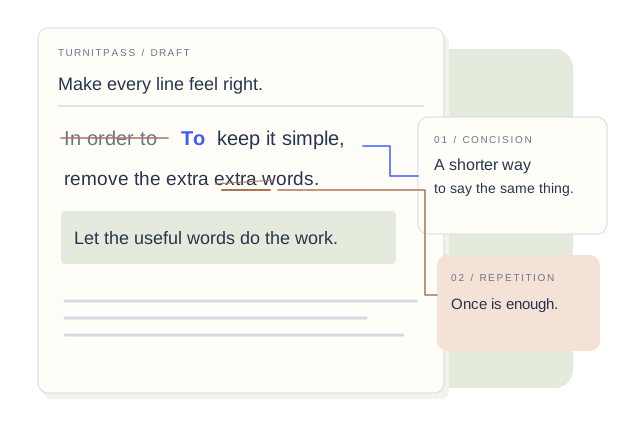
La transparence visuelle compte lorsque vous relisez des brouillons réécrits. TurnitPass conserve l’original à côté d’un résultat aux modifications surlignées, afin que vous puissiez examiner, éditer, copier ou télécharger en gardant le contrôle total.
La norme de rédaction et de relecture côte à côte
Lorsqu’un outil masque chaque modification, vous risquez de conserver une citation altérée, un nom mal placé ou une affirmation inexacte. Un flux de travail utilisable doit montrer ce qui a changé.
TurnitPass affiche l’original d’un côté et le résultat réécrit de l’autre, avec les formulations ajoutées et supprimées en surbrillance. Cette couche de relecture distingue la réécriture occasionnelle de la publication.
Les différences surlignées accélèrent la relecture : vous repérez les changements, corrigez une ligne et passez à la suite, au lieu de relire toute la page.
Copiez ou téléchargez le brouillon poli lorsque vous avez besoin d’un second lecteur, et gardez le reste du flux de travail dans un seul espace.
Intégrer l’Humaniseur d’IA et les passes de citations
Un pipeline d’édition complet ne s’arrête pas à la structure des phrases. Les articles académiques, les rapports et les articles SEO ont aussi besoin de bibliographies exactes, avec chaque citation intacte après la réécriture.
TurnitPass réunit dans un même produit l’Humaniseur d’IA, Reformulation et amélioration, la Réécriture IA, le Détecteur d’IA, le Générateur de citations et la Bibliographie. Après une réécriture, mettez les sources en forme selon APA, MLA, Chicago, IEEE, Harvard, GB/T 7714 et les autres styles pris en charge.
Vous pouvez humaniser la prose, vérifier les signaux d’écriture IA et établir la bibliographie sans passer d’un site non lié à l’autre.
La réécriture en anglais peut préserver une liste de termes. Les outils d’écriture prennent en charge l’anglais, le chinois simplifié et le chinois traditionnel, et acceptent le texte collé ainsi que les fichiers TXT, Markdown, DOCX et PDF.
- Vérifiez que les références, les liens DOI et les citations n’ont pas été altérés pendant la réécriture.
- Choisissez l’outil adapté : Humaniseur (Naturel ou Approfondi), Reformulation et amélioration (Léger, Naturel ou Approfondi), ou Réécriture IA pour les passages académiques.
- Lancez le Détecteur d’IA sur le brouillon modifié pour voir quels passages paraissent encore trop réguliers.
Clés API pour développeurs, automatisation et traitements en volume
Pour les équipes produit, le copier-coller ne passe pas à l’échelle. Il faut des points d’accès documentés, une gestion des clés et un historique d’utilisation. Créez une clé API dans votre compte TurnitPass et partez de là.
L’API couvre l’humanisation, la paraphrase, la réécriture, la détection, les citations et la bibliographie : la même réécriture peut donc s’exécuter dans votre propre CMS ou produit d’écriture.
Transmettez la clé en tant que jeton Bearer depuis votre code côté serveur. La documentation et les exemples de code se trouvent sur les pages destinées aux développeurs.
Chaque requête est enregistrée, et les points d’accès d’écriture déduisent les crédits d’écriture, comptés en mots, du même solde que celui utilisé sur le site.
Optimiser les chaînes éditoriales des équipes
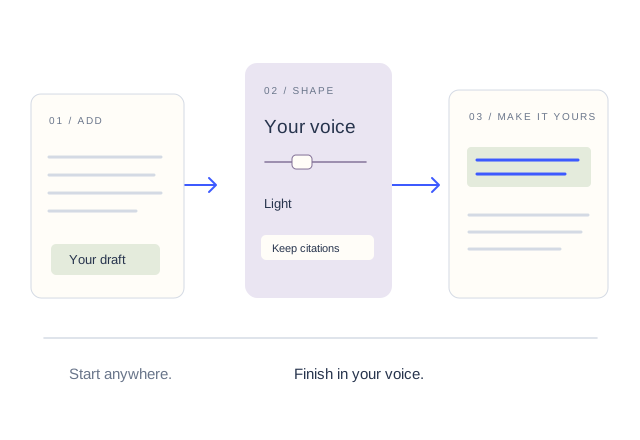
Pour les équipes de rédaction professionnelles, l’optimisation consiste à mettre en place une chaîne reproductible et fiable. Chaque brouillon doit passer par des étapes structurées, de la recherche et du plan jusqu’à l’humanisation, la mise en forme des citations et la relecture finale.
Les rédacteurs peuvent produire le plan et les preuves ; les éditeurs peuvent utiliser la vue côte à côte de TurnitPass pour polir le style, vérifier les faits et renvoyer un brouillon plus propre.
L’humanisation, la paraphrase, la détection et les citations se trouvent dans un même espace de travail : l’équipe n’a pas à passer d’un site non lié à l’autre.
Une chaîne reproductible reste la meilleure option : plan, réécriture, examen des modifications, mise en forme des sources, puis détection de la version que vous prévoyez de publier.