01
Start speedCan you test a real draft immediately?
A useful humanizer page opens straight into a working editor, not a long pitch before the tool appears.
Compare natural expression, editing controls, citations and API access. Then try TurnitPass with a draft of your own.
Explore the tools you are considering, compare their writing workflows and try TurnitPass with a passage you already know.
A practical comparison for writers who want a cleaner humanizer workflow, side-by-side review, and a global product surface.
A comparison for users who want a modern humanizer interface, document-aware writing tools, and transparent review before submission.
Compare natural expression, editing controls, citation handling and API integration. Start with the capabilities you need, then try your own draft in TurnitPass.
A useful humanizer page opens straight into a working editor, not a long pitch before the tool appears.
Side-by-side review matters when meaning, citations, and claims need to survive the rewrite.
A detector-aware workflow should show what changed and what still needs human review — not present a score as a final verdict.
Teams eventually need dashboard access, API keys, billing state, and stable endpoint behavior.
A stronger comparison looks past marketing claims to a practical question: does the product let you paste, revise, review, check, cite, and scale without switching tools?
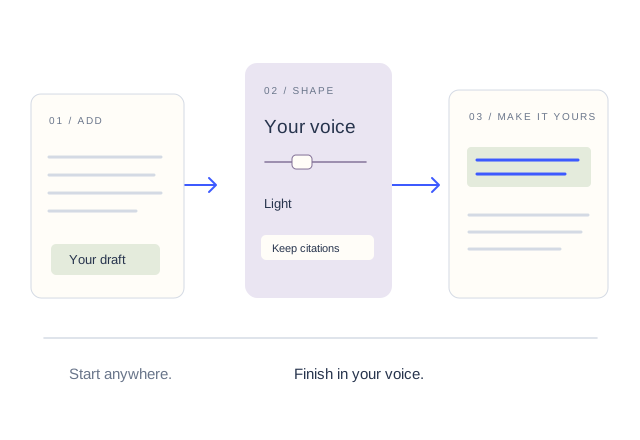
Start in the Humanizer with pasted text or uploaded documents, then review the output beside the original draft.
After rewriting, review AI-like patterns and continue editing the highest-risk passages.
The Citation Generator and Bibliography tools sit beside the rewrite flow for essays, reports, and source-heavy writing.
Dashboard keys, v1 endpoints, and plan-aware usage carry the same workflow into another product.
Paste text into the workbench and review the revised version side by side with the original before deciding which workflow fits.
Detector-result claims are hard to verify across changing systems, since detectors update their models over time. Workflow checks are easier to evaluate: can you start quickly, review meaning, preserve sources, read detection signals, and scale through an API?
No. The comparison pages help you decide what to inspect, but the useful test is still running your own draft through the Humanizer and AI Detector.
Yes. TurnitPass includes the Humanizer, AI Detector, rewriter, paraphraser, Citation Generator, Bibliography, dashboard, pricing, and API.